InMyTeam QA Dashboard: Smarter Home Care Documentation Review & Compliance Management
In the home care industry, accurate caregiver documentation is essential for compliance, billing, patient safety, and operational efficiency. Reviewing caregiver notes manually can be time-consuming and prone to oversight — especially for agencies managing large volumes of visits every day.
That’s why the InMyTeam QA Dashboard was built: a powerful quality assurance and compliance monitoring solution designed specifically for home care agencies.
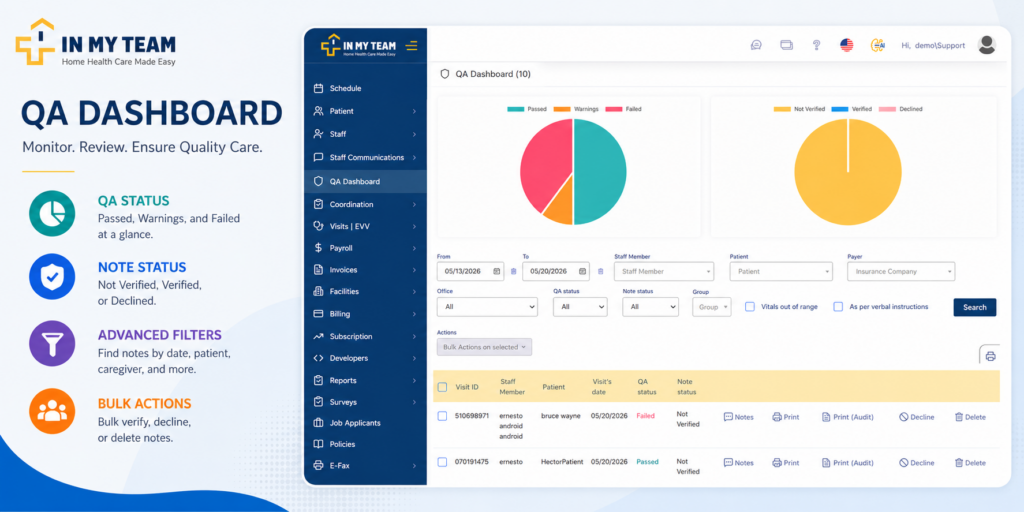
The QA Dashboard helps administrators, office staff, and QA teams quickly review caregiver notes, identify documentation issues, monitor Plan of Care compliance, and streamline note verification workflows — all from one centralized dashboard.
What Is the InMyTeam QA Dashboard?
The InMyTeam QA Dashboard is an advanced caregiver note review system that automatically evaluates visit documentation based on the patient’s Plan of Care (POC), completed caregiver tasks, and recorded vitals.
Instead of manually reviewing every visit note one by one, agencies can instantly identify:
- Incomplete caregiver notes
- Missing Plan of Care attachments
- Out-of-range vital signs
- Patient refusals
- Compliance risks
- Notes requiring administrative review
The result is faster QA processing, improved compliance, and greater operational visibility.
Automated QA Status System for Caregiver Notes
One of the most powerful features of the dashboard is the automated QA Status engine. Each caregiver note is analyzed and assigned a quality status based on task completion and documentation accuracy.
✅ Passed Status
A note receives a Passed QA status when:
- More than 80% of assigned tasks were completed
- Documentation aligns with the patient’s Plan of Care
- No major compliance concerns are detected
This status helps agencies quickly confirm that care was properly documented and completed.
⚠️ Warning Status
A note receives a Warning status when:
- Less than 80% of tasks were completed
- The patient refused one or more tasks
- Vital signs are outside acceptable ranges
Warnings help QA teams identify notes that may need follow-up or additional review without immediately failing the documentation.
This feature is especially valuable for:
- Home health agencies
- Medicaid waiver providers
- Personal care services
- Skilled nursing documentation oversight
❌ Failed Status
A note receives a Failed QA status when:
- Less than 50% of tasks were completed
- No tasks were completed for one or more services listed in the Plan of Care
Failed notes allow agencies to quickly identify serious documentation issues that could impact:
- Compliance audits
- EVV verification
- Insurance reimbursement
- Patient care quality
- Regulatory reporting
Note Verification Workflow
Beyond QA scoring, the InMyTeam QA Dashboard also tracks the administrative review status of every caregiver note.
✔️ Verified
The caregiver note has been reviewed and approved by an administrator or QA reviewer.
⏳ Not Verified
The note has been submitted but has not yet been reviewed by the office staff.
🚫 Declined
The administrator identified errors, missing information, or incomplete documentation.
When declining a note:
- Admins can leave comments explaining the reason for decline
- Caregivers may be allowed to redo the note (depending on agency settings)
- Original clock-in and clock-out times remain locked for compliance integrity
This creates a structured quality control process while protecting visit verification records.
Detect Missing Plans of Care (POC)
One of the biggest compliance risks in home care is incomplete documentation tied to missing care plans.
The QA Dashboard can flag notes where:
- No Plan of Care was attached
- Office staff failed to upload the POC
- Visits were documented “As Per Verbal Instructions”
This helps agencies quickly identify documentation gaps before they become compliance or audit issues.
The “As Per Verbal Instructions” filter is particularly useful for detecting unintentionally missing Plans of Care and ensuring proper care documentation procedures are followed.
Advanced Filtering & Search Capabilities
The InMyTeam QA Dashboard includes robust filtering tools that make it easy to locate, review, and manage caregiver notes efficiently.
Users can filter notes by:
- Date range
- Patient
- Caregiver
- Insurance provider
- Office location
- QA status
- Verification status
- Groups
- Vital signs out of range only
- “As Per Verbal Instructions”
These advanced filters help agencies prioritize high-risk documentation and improve workflow efficiency.
Bulk Actions for Faster QA Management
Managing hundreds or thousands of caregiver notes manually can slow down operations. The QA Dashboard simplifies administrative work with bulk action capabilities.
Administrators can:
- Bulk verify notes
- Bulk decline notes
- Bulk delete notes
This significantly reduces administrative workload and speeds up documentation review processes across the organization.
Benefits of the InMyTeam QA Dashboard
Improve Home Care Compliance
Automatically identify incomplete documentation, missing tasks, and care plan inconsistencies before audits occur.
Reduce Administrative Work
Bulk actions and advanced filters streamline note review and save valuable staff time.
Monitor Caregiver Performance
Gain visibility into caregiver documentation accuracy, task completion rates, and patient refusals.
Detect High-Risk Visits Faster
Instantly identify out-of-range vitals, failed notes, and missing Plan of Care documentation.
Enhance Operational Efficiency
Centralized QA management improves communication between caregivers, office staff, and administrators.
Why Home Care Agencies Need a QA Dashboard
As home care regulations become more demanding, agencies need smarter tools to maintain documentation accuracy and operational compliance.
The InMyTeam QA Dashboard helps agencies:
- Maintain audit readiness
- Improve caregiver accountability
- Reduce documentation errors
- Ensure Plan of Care compliance
- Strengthen quality assurance processes
- Improve patient care oversight
Whether your agency manages personal care, home health, Medicaid waiver services, or skilled nursing visits, the QA Dashboard provides the visibility and control needed to manage caregiver documentation effectively.
Final Thoughts
The InMyTeam QA Dashboard is more than a caregiver note review tool — it’s a complete home care quality assurance solution designed to help agencies improve compliance, streamline workflows, and maintain documentation accuracy at scale.
By combining automated QA scoring, note verification workflows, advanced filtering, missing POC detection, and bulk administrative actions, InMyTeam empowers agencies to deliver higher-quality care while reducing operational burden.
Ready to Simplify Home Care QA?
If your agency is looking for a smarter way to manage caregiver documentation, improve compliance, and streamline administrative reviews, the InMyTeam QA Dashboard can help.
Schedule a demo today and discover how InMyTeam can transform your home care QA process.